
Fast, Seamless PC Migration


- Fully automated remote PC migration –
No more hard drives. - Users continue working during migration –
Zero downtime - No-brainer pricing from as little as $19.95
per computer.
*No credit card required.
*Designed for Microsoft Windows
4 Step PC Migration Process
PC Migration without user interruption.
Step 1

PREPARE YOUR NEW PC
Install Windows & required applications on the new PC.
Step 2

LINK DEVICES
Install PC Migration Pro on both devices and use your unique link code to connect them.
Step 3

AUTOMATED MIGRATION
Remotely migrate all the files and settings while the user continues to work uninterrupted on their old device.
Step 4

UPDATE & SWITCH
When handing the new device to the user, simply perform an update migration to transfer any new or changed files.
TESTIMONIALS
Discover the experiences of our satisfied users
PC Migration Pro Features list
Starting from as little as $19.95 per month per computer*
Features:
- Use unique one license code for multiple devices.
- Designed for Microsoft Windows.
- Easily link two devices through a simple to use link code.
- Remotely monitor migration from new device.
- Network-based device-to-device migration.
- Optimized file transfers for speed.
- Smart network-route discovery for efficient transfers.
- Transfer all data, settings, and Cloud drive locations.
- Relocate shortcuts (Desktop, Documents) to new locations.

PC Migration Pro Pricing and Licensing
Select the best fit for you from our Free Edition, IT Admins & Teams packages, discounted Reseller licenses, and more.
Watch PC Migration Pro in Action
The fast and simple way to migrate users to a new device while they work.
Explore PC Migration Pro
Experience the speed and simplicity of our automated PC migration software.
1

Welcome to PC Migration Pro. Simple select the old or new computer.
2
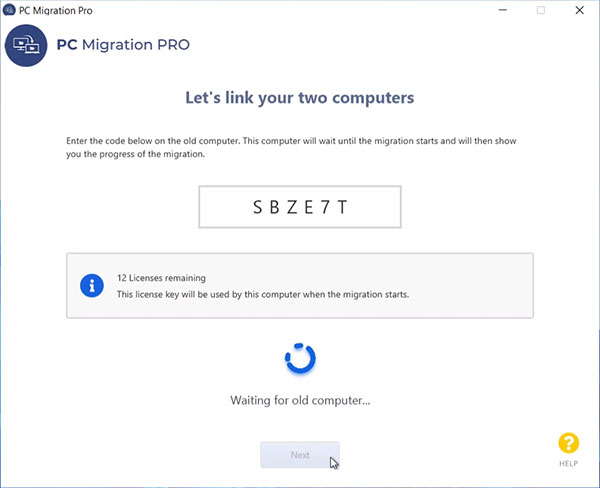
Easily link your two computers using a simple link code.
3

Settings & files are automatically included - initiate migration with a single click.
4

Seamlessly track your migration progress while continuing your work.
5

Run an update migration for any new or changed files and handover the new device.
PC MIGRATION PRO FAQ'S
PC Migration Pro is a tool that allows IT technicians to migrate a user to a new computer while they continue working, reducing their downtime to minutes.
Typically, migrating a user involves an IT technician finding the hard drive and manually copying all the files for the user. All the settings, including a profile and email, would then need to be manually configured on the new computer, and all the files would need to be copied back to the right location, risking the user not having all of their data
migrated.
PC Migration Pro can migrate files on the desktop, data across various locations, including documents, pictures, and data on OneDrive and other volumes, email and profile settings, browser favorites, extensions, and history.
The IT technician first needs to select the new computer in the tool and enter the license key, and the old computer needs to be selected as the source and linked to the new computer using a link code. The tool will then scan the old computer and transfer files to the new computer in the background while the user continues working. Once the transfer is complete, the user saves and closes their files and the technician performs an update migration to transfer any new or changed files. Finally, the user logs in to the new computer to complete the migration.
Yes, PC Migration Pro can be fully white labeled, enabling OEM system integrators, MSPs, and large resellers to include or sell it as their own value-added product.